File Mover Blog

  • 03 Oct

    How to use the AWS AssumeRole function

    AWS AssumeRole

    Q: To connect to a client’s S3 bucket, we need to switch to a dedicated AWS role. To do this, we need the AWS AssumeRole function.

    Do you know if it’s possible to set this up?
    A: Added in version v2026.8.17.0

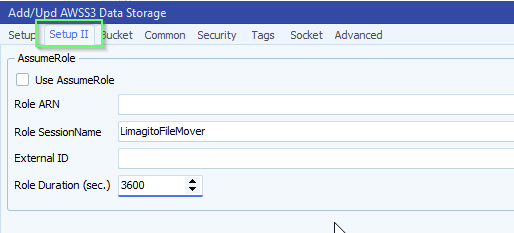
    • AWS, Added AssumeRole option (v2026.8.17.0) [+]
    limagito filemover AWS assumerole option

    If you need any help about this new ‘AWS AssumeRole’ option, please let us know.

    Best Regards,

    Limagito Team

    #AWSS3 #managedfiletransfer #filetransfer #filemanagement #limagito

    By Limagito-Team AWS S3 ,
  • 03 Oct

    FileMover – Web Components Missing

    Web Components Missing

    Q: As a company, we’ve been using FileMover for some years now (very pleased – it’s a great product).

    We would now like to make use of the Web component to access it remotely on our internal network.

    I believe we didn’t check the box to install the additional Web Component during initial installation – which would explain why we cannot use the LimagitoXC config program to just install the web components.

    Is it safe to re-run the installer over the existing installation, to add the web component files to our installation – without damaging our existing installation / config?

    Any guidance / support would be much appreciated.

    A: Yes it is safe, do not uninstall the previous version. Just stop all Limagito related applications and services. Be sure to use an installer that is allowed within your license expiration.

    If you need any help about this ‘Web Components Missing’ question, please let us know.

    Best Regards,

    Limagito Team

    #managedfiletransfer #filetransfer #filemanagement #limagito

    By Limagito-Team Remote Tool
  • 03 Oct

    Question about a Limagito rule and file date filtering

    File date filtering

    Q: We are currently thinking about creating a new Limagito rule to process files, and I would like to get your advice on the best way to implement it.

    Here is the context:

    • Every day, a large number of XML files are dropped into three different folders.
    • For each folder, we would like to identify the files that were created between yesterday at 3:00 AM and today at 2:59 AM.
    • The files identified in each folder will then be zipped and uploaded via SFTP.

    We initially thought about using the DateFiler function with the “Older than” and “Younger than” conditions. However, we realized that if a user manually triggers the rule, the time window will no longer be correct.

    Is there a way to define the time window as “yesterday at 3:00 AM to today at 2:59 AM”, regardless of when the rule is actually executed?

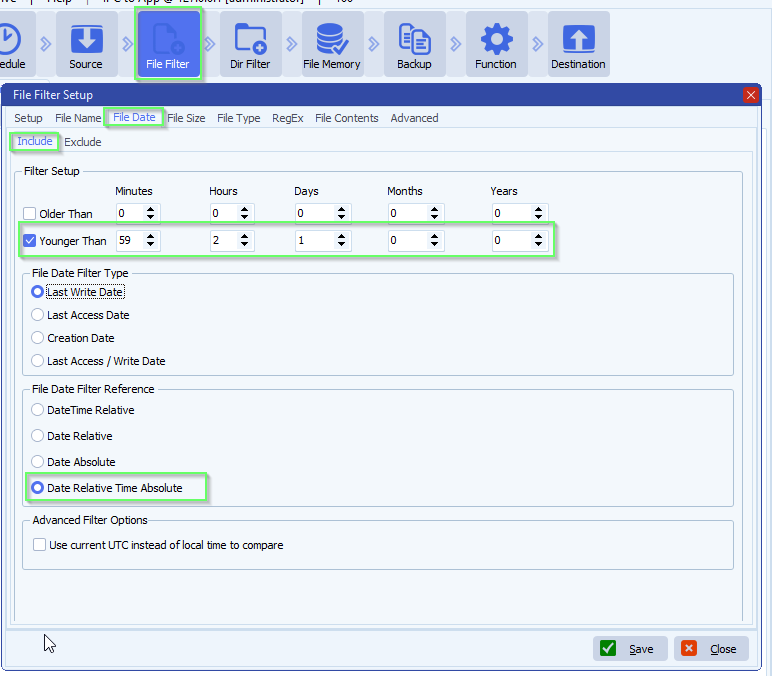
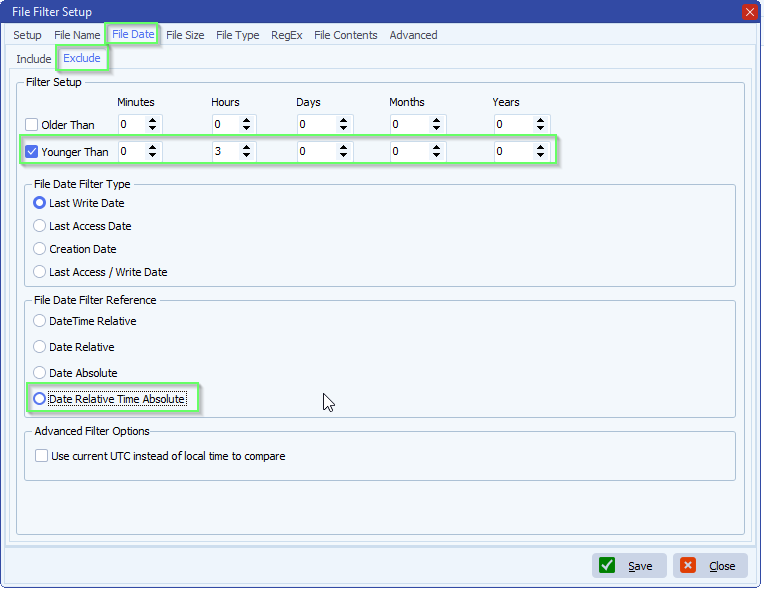
    A: We added a new ‘File Date Relative – Time Absolute Filter’ in version v2026.10.3.0

    In your case you’ll need both include and exclude file date filter:

    limagito filemover file date filtering

    limagito filemover file date filtering

    If you need any help about this new ‘file date filtering’ option, please let us know.

    Best Regards,

    Limagito Team

    #managedfiletransfer #filetransfer #filemanagement #limagito
1 2 3 4 … 174
SEARCH